Indexer API
The Envio Indexer provides a powerful way to query any information, past events or metadata from the LUKSO blockchain. It offers flexible querying capabilities with support for filtering and real-time subscriptions.
Get Started
This guide covers how to query the LUKSO Indexer using GraphQL, with practical examples and code samples.
Choose the client that best fits your use case:
- HTTP client: Best for one-time queries, searches, and fetching data on demand
- WebSocket client: Best for real-time updates, monitoring changes, and live data feeds
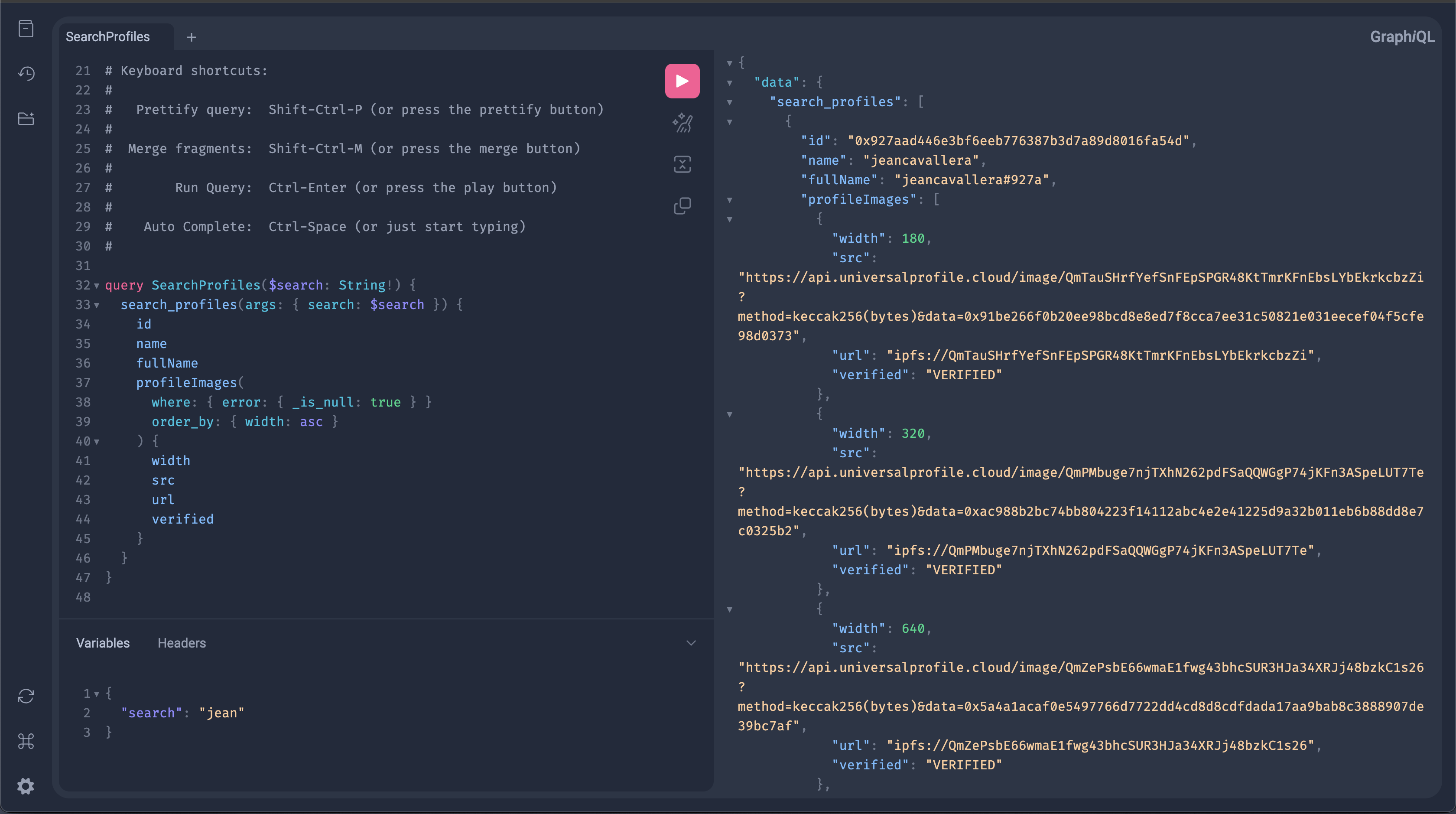
Explore the full schema and test queries in the interactive playground: https://envio.lukso-mainnet.universal.tech/
GraphQL Endpoint:
- Mainnet
- Testnet
https://envio.lukso-mainnet.universal.tech/v1/graphql
https://envio.lukso-testnet.universal.tech/v1/graphql
HTTP Client
Install the graphql-request library to interact with the indexer:
Any GraphQL client library will work for querying the LUKSO Indexer.
npm install graphql-request graphql
Once installed, you can start making queries:
import { request, gql } from 'graphql-request';

const GRAPHQL_ENDPOINT =
  'https://envio.lukso-mainnet.universal.tech/v1/graphql';

// Example query to retrieve the Universal Profile's name and its images
const query = gql`
  query {
    Profile(limit: 5) {
      id
      name
      fullName
    }
  }
`;

const data = await request(GRAPHQL_ENDPOINT, query);
console.log(data);
Query Examples
Below are the most common use cases for querying the LUKSO Indexer:
Search for profiles by name, address, or other identifiers using the search_profiles function.
import { request, gql } from 'graphql-request';
const GRAPHQL_ENDPOINT =
'https://envio.lukso-mainnet.universal.tech/v1/graphql';
// Query to search for Universal Profiles by name or address
// Returns matching profiles with their images sorted by width (smallest first)
const searchProfilesQuery = gql`
query SearchProfiles($search: String!) {
  search_profiles(args: { search: $search }) {
    id
    name
    fullName
    profileImages(
      where: { error: { _is_null: true } }
      order_by: { width: asc }
    ) {
      width
      src
      url
      verified
    }
  }
}
`;
type ProfileImage = {
width: number;
src: string;
url: string;
verified: boolean;
};
type Profile = {
id: string;
name?: string;
fullName?: string;
profileImages?: ProfileImage[];
};
type SearchProfilesResponse = {
search_profiles: Profile[];
};
async function searchProfiles(searchTerm: string): Promise<Profile[]> {
try {
const data = await request<SearchProfilesResponse>(
GRAPHQL_ENDPOINT,
searchProfilesQuery,
{ search: searchTerm },
);
return data.search_profiles;
} catch (error) {
console.error('Error searching profiles:', error);
throw error;
}
}
// Usage: Search for profiles containing "lukso" in their name or address
const profiles = await searchProfiles('lukso');
type Profile {
  id: String!
  name: String
  fullName: String
  profileImages: [ProfileImageURL!]!
  # ... other fields
}

type ProfileImageURL {
  width: Int
  src: String
  url: String
  verified: verificationstatus!
  # ... other fields
}
WebSocket Client
For real-time data subscriptions, use the WebSocket protocol with the graphql-ws library:
npm install graphql-ws
Once installed, you can subscribe to live updates:
import { createClient } from 'graphql-ws';

const wsClient = createClient({
  url: 'wss://envio.lukso-mainnet.universal.tech/v1/graphql',
});

// Subscribe to profile updates for a specific Universal Profile address
const subscription = wsClient.subscribe(
  {
    query: `
      subscription OnProfileUpdate($profileId: String!) {
        Profile(where: { id: { _eq: $profileId } }) {
          id
          name
          fullName
          profileImages(where: { error: { _is_null: true } }) {
            src
            url
          }
        }
      }
    `,
    variables: { profileId: '0x...' },
  },
  {
    next: (data) => {
      console.log('Profile updated:', data);
    },
    error: (error) => {
      console.error('Subscription error:', error);
    },
    complete: () => {
      console.log('Subscription complete');
    },
  },
);

// Unsubscribe when done
subscription();